TREAT - Lockbox
Adding Items to a Partial Lock
Overview
For a partial lockbox, creating the lockbox is only the first step. You must go to each item that needs protecting and add it to the lockbox.

Adding an Item
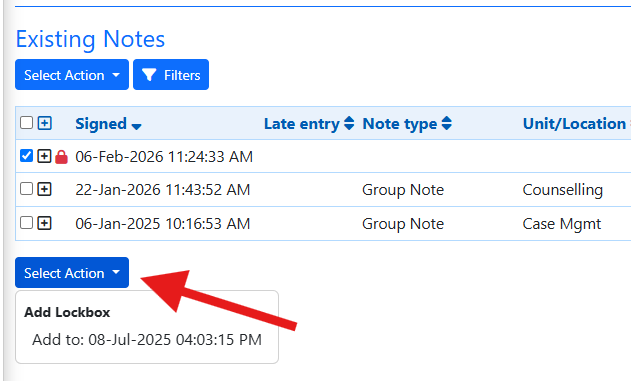
Navigate to the item to protect, open its Select Action menu, and find the lockbox there to add the item.
What a Partial Lock Can Protect
- Progress notes
- Assessments
- External documents
- IPCC Care Plan issues
- The entire Client Profile
Demographics. Demographics are not included in a partial lock restriction.
Training Video
Adding Items to a Partial Lock - User Instructions | Author: Michael Marchese | 2026-07-17
Was this article helpful?
That’s Great!
Thank you for your feedback
Sorry! We couldn't be helpful
Thank you for your feedback
Feedback sent
We appreciate your effort and will try to fix the article