TREAT - Lockbox
Breaking a Lock
Overview
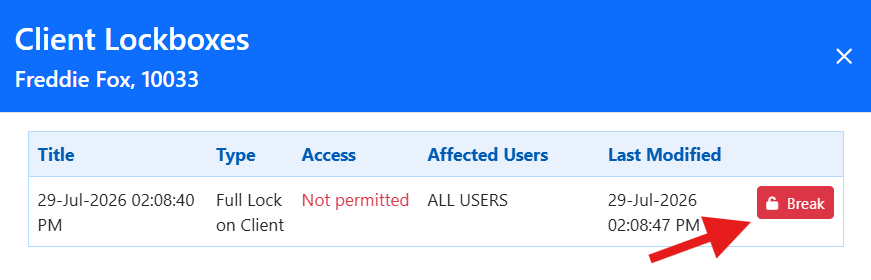
When a worker needs to access a locked chart, they can break the lock temporarily if they have the applicable permission. Breaking a lock is an audited event intended for situations where temporary access is required, not a standard access path.
The action is recorded and the appropriate people, usually the Privacy Officer, are notified.

How to Break a Lock
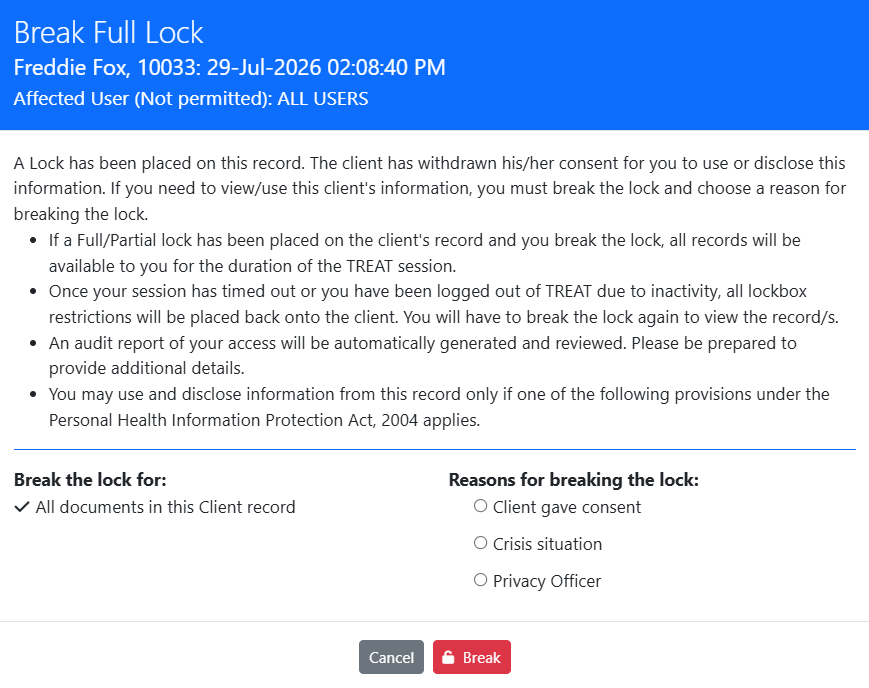
- Select the BREAK button. A disclaimer is displayed.
- If you should not proceed, select CANCEL to back out of the chart.
- To proceed, select the applicable Reason and select BREAK.
Permission is governed carefully. No one has the permission to break a lock by default. It should be granted only to users who genuinely require it, because it allows temporary access to restricted information.
Training Video
Breaking a Lock - User Instructions | Author: Michael Marchese | 2026-07-17
Was this article helpful?
That’s Great!
Thank you for your feedback
Sorry! We couldn't be helpful
Thank you for your feedback
Feedback sent
We appreciate your effort and will try to fix the article